| 1 | // Copyright 2014 The Flutter Authors. All rights reserved. |
| 2 | // Use of this source code is governed by a BSD-style license that can be |
|---|
| 3 | // found in the LICENSE file. |
|---|
| 4 | |
|---|
| 5 | import 'dart:async'; |
|---|
| 6 | import 'dart:io' show File; |
|---|
| 7 | |
|---|
| 8 | import 'package:flutter/foundation.dart'; |
|---|
| 9 | import 'package:flutter/scheduler.dart'; |
|---|
| 10 | import 'package:flutter/semantics.dart'; |
|---|
| 11 | |
|---|
| 12 | import 'basic.dart'; |
|---|
| 13 | import 'binding.dart'; |
|---|
| 14 | import 'disposable_build_context.dart'; |
|---|
| 15 | import 'framework.dart'; |
|---|
| 16 | import 'localizations.dart'; |
|---|
| 17 | import 'media_query.dart'; |
|---|
| 18 | import 'placeholder.dart'; |
|---|
| 19 | import 'scroll_aware_image_provider.dart'; |
|---|
| 20 | import 'text.dart'; |
|---|
| 21 | import 'ticker_provider.dart'; |
|---|
| 22 | |
|---|
| 23 | export 'package:flutter/painting.dart' show |
|---|
| 24 | AssetImage, |
|---|
| 25 | ExactAssetImage, |
|---|
| 26 | FileImage, |
|---|
| 27 | FilterQuality, |
|---|
| 28 | ImageConfiguration, |
|---|
| 29 | ImageInfo, |
|---|
| 30 | ImageProvider, |
|---|
| 31 | ImageStream, |
|---|
| 32 | MemoryImage, |
|---|
| 33 | NetworkImage; |
|---|
| 34 | |
|---|
| 35 | // Examples can assume: |
|---|
| 36 | // late Widget image; |
|---|
| 37 | // late ImageProvider _image; |
|---|
| 38 | |
|---|
| 39 | /// Creates an [ImageConfiguration] based on the given [BuildContext] (and |
|---|
| 40 | /// optionally size). |
|---|
| 41 | /// |
|---|
| 42 | /// This is the object that must be passed to [BoxPainter.paint] and to |
|---|
| 43 | /// [ImageProvider.resolve]. |
|---|
| 44 | /// |
|---|
| 45 | /// If this is not called from a build method, then it should be reinvoked |
|---|
| 46 | /// whenever the dependencies change, e.g. by calling it from |
|---|
| 47 | /// [State.didChangeDependencies], so that any changes in the environment are |
|---|
| 48 | /// picked up (e.g. if the device pixel ratio changes). |
|---|
| 49 | /// |
|---|
| 50 | /// See also: |
|---|
| 51 | /// |
|---|
| 52 | /// * [ImageProvider], which has an example showing how this might be used. |
|---|
| 53 | ImageConfiguration createLocalImageConfiguration(BuildContext context, { Size? size }) { |
|---|
| 54 | return ImageConfiguration( |
|---|
| 55 | bundle: DefaultAssetBundle.of(context), |
|---|
| 56 | devicePixelRatio: MediaQuery.maybeDevicePixelRatioOf(context) ?? 1.0, |
|---|
| 57 | locale: Localizations.maybeLocaleOf(context), |
|---|
| 58 | textDirection: Directionality.maybeOf(context), |
|---|
| 59 | size: size, |
|---|
| 60 | platform: defaultTargetPlatform, |
|---|
| 61 | ); |
|---|
| 62 | } |
|---|
| 63 | |
|---|
| 64 | /// Prefetches an image into the image cache. |
|---|
| 65 | /// |
|---|
| 66 | /// Returns a [Future] that will complete when the first image yielded by the |
|---|
| 67 | /// [ImageProvider] is available or failed to load. |
|---|
| 68 | /// |
|---|
| 69 | /// If the image is later used by an [Image] or [BoxDecoration] or [FadeInImage], |
|---|
| 70 | /// it will probably be loaded faster. The consumer of the image does not need |
|---|
| 71 | /// to use the same [ImageProvider] instance. The [ImageCache] will find the image |
|---|
| 72 | /// as long as both images share the same key, and the image is held by the |
|---|
| 73 | /// cache. |
|---|
| 74 | /// |
|---|
| 75 | /// The cache may refuse to hold the image if it is disabled, the image is too |
|---|
| 76 | /// large, or some other criteria implemented by a custom [ImageCache] |
|---|
| 77 | /// implementation. |
|---|
| 78 | /// |
|---|
| 79 | /// The [ImageCache] holds a reference to all images passed to |
|---|
| 80 | /// [ImageCache.putIfAbsent] as long as their [ImageStreamCompleter] has at |
|---|
| 81 | /// least one listener. This method will wait until the end of the frame after |
|---|
| 82 | /// its future completes before releasing its own listener. This gives callers a |
|---|
| 83 | /// chance to listen to the stream if necessary. A caller can determine if the |
|---|
| 84 | /// image ended up in the cache by calling [ImageProvider.obtainCacheStatus]. If |
|---|
| 85 | /// it is only held as [ImageCacheStatus.live], and the caller wishes to keep |
|---|
| 86 | /// the resolved image in memory, the caller should immediately call |
|---|
| 87 | /// `provider.resolve` and add a listener to the returned [ImageStream]. The |
|---|
| 88 | /// image will remain pinned in memory at least until the caller removes its |
|---|
| 89 | /// listener from the stream, even if it would not otherwise fit into the cache. |
|---|
| 90 | /// |
|---|
| 91 | /// Callers should be cautious about pinning large images or a large number of |
|---|
| 92 | /// images in memory, as this can result in running out of memory and being |
|---|
| 93 | /// killed by the operating system. The lower the available physical memory, the |
|---|
| 94 | /// more susceptible callers will be to running into OOM issues. These issues |
|---|
| 95 | /// manifest as immediate process death, sometimes with no other error messages. |
|---|
| 96 | /// |
|---|
| 97 | /// The [BuildContext] and [Size] are used to select an image configuration |
|---|
| 98 | /// (see [createLocalImageConfiguration]). |
|---|
| 99 | /// |
|---|
| 100 | /// The returned future will not complete with error, even if precaching |
|---|
| 101 | /// failed. The `onError` argument can be used to manually handle errors while |
|---|
| 102 | /// pre-caching. |
|---|
| 103 | /// |
|---|
| 104 | /// See also: |
|---|
| 105 | /// |
|---|
| 106 | /// * [ImageCache], which holds images that may be reused. |
|---|
| 107 | Future<void> precacheImage( |
|---|
| 108 | ImageProvider provider, |
|---|
| 109 | BuildContext context, { |
|---|
| 110 | Size? size, |
|---|
| 111 | ImageErrorListener? onError, |
|---|
| 112 | }) { |
|---|
| 113 | final ImageConfiguration config = createLocalImageConfiguration(context, size: size); |
|---|
| 114 | final Completer<void> completer = Completer<void>(); |
|---|
| 115 | final ImageStream stream = provider.resolve(config); |
|---|
| 116 | ImageStreamListener? listener; |
|---|
| 117 | listener = ImageStreamListener( |
|---|
| 118 | (ImageInfo? image, bool sync) { |
|---|
| 119 | if (!completer.isCompleted) { |
|---|
| 120 | completer.complete(); |
|---|
| 121 | } |
|---|
| 122 | // Give callers until at least the end of the frame to subscribe to the |
|---|
| 123 | // image stream. |
|---|
| 124 | // See ImageCache._liveImages |
|---|
| 125 | SchedulerBinding.instance.addPostFrameCallback((Duration timeStamp) { |
|---|
| 126 | stream.removeListener(listener!); |
|---|
| 127 | }, debugLabel: 'precacheImage.removeListener' ); |
|---|
| 128 | }, |
|---|
| 129 | onError: (Object exception, StackTrace? stackTrace) { |
|---|
| 130 | if (!completer.isCompleted) { |
|---|
| 131 | completer.complete(); |
|---|
| 132 | } |
|---|
| 133 | stream.removeListener(listener!); |
|---|
| 134 | if (onError != null) { |
|---|
| 135 | onError(exception, stackTrace); |
|---|
| 136 | } else { |
|---|
| 137 | FlutterError.reportError(FlutterErrorDetails( |
|---|
| 138 | context: ErrorDescription('image failed to precache' ), |
|---|
| 139 | library: 'image resource service' , |
|---|
| 140 | exception: exception, |
|---|
| 141 | stack: stackTrace, |
|---|
| 142 | silent: true, |
|---|
| 143 | )); |
|---|
| 144 | } |
|---|
| 145 | }, |
|---|
| 146 | ); |
|---|
| 147 | stream.addListener(listener); |
|---|
| 148 | return completer.future; |
|---|
| 149 | } |
|---|
| 150 | |
|---|
| 151 | /// Signature used by [Image.frameBuilder] to control the widget that will be |
|---|
| 152 | /// used when an [Image] is built. |
|---|
| 153 | /// |
|---|
| 154 | /// The `child` argument contains the default image widget and is guaranteed to |
|---|
| 155 | /// be non-null. Typically, this builder will wrap the `child` widget in some |
|---|
| 156 | /// way and return the wrapped widget. If this builder returns `child` directly, |
|---|
| 157 | /// it will yield the same result as if [Image.frameBuilder] was null. |
|---|
| 158 | /// |
|---|
| 159 | /// The `frame` argument specifies the index of the current image frame being |
|---|
| 160 | /// rendered. It will be null before the first image frame is ready, and zero |
|---|
| 161 | /// for the first image frame. For single-frame images, it will never be greater |
|---|
| 162 | /// than zero. For multi-frame images (such as animated GIFs), it will increase |
|---|
| 163 | /// by one every time a new image frame is shown (including when the image |
|---|
| 164 | /// animates in a loop). |
|---|
| 165 | /// |
|---|
| 166 | /// The `wasSynchronouslyLoaded` argument specifies whether the image was |
|---|
| 167 | /// available synchronously (on the same |
|---|
| 168 | /// [rendering pipeline frame](rendering/RendererBinding/drawFrame.html) as the |
|---|
| 169 | /// `Image` widget itself was created) and thus able to be painted immediately. |
|---|
| 170 | /// If this is false, then there was one or more rendering pipeline frames where |
|---|
| 171 | /// the image wasn't yet available to be painted. For multi-frame images (such |
|---|
| 172 | /// as animated GIFs), the value of this argument will be the same for all image |
|---|
| 173 | /// frames. In other words, if the first image frame was available immediately, |
|---|
| 174 | /// then this argument will be true for all image frames. |
|---|
| 175 | /// |
|---|
| 176 | /// This builder must not return null. |
|---|
| 177 | /// |
|---|
| 178 | /// See also: |
|---|
| 179 | /// |
|---|
| 180 | /// * [Image.frameBuilder], which makes use of this signature in the [Image] |
|---|
| 181 | /// widget. |
|---|
| 182 | typedef ImageFrameBuilder = Widget Function( |
|---|
| 183 | BuildContext context, |
|---|
| 184 | Widget child, |
|---|
| 185 | int? frame, |
|---|
| 186 | bool wasSynchronouslyLoaded, |
|---|
| 187 | ); |
|---|
| 188 | |
|---|
| 189 | /// Signature used by [Image.loadingBuilder] to build a representation of the |
|---|
| 190 | /// image's loading progress. |
|---|
| 191 | /// |
|---|
| 192 | /// This is useful for images that are incrementally loaded (e.g. over a local |
|---|
| 193 | /// file system or a network), and the application wishes to give the user an |
|---|
| 194 | /// indication of when the image will be displayed. |
|---|
| 195 | /// |
|---|
| 196 | /// The `child` argument contains the default image widget and is guaranteed to |
|---|
| 197 | /// be non-null. Typically, this builder will wrap the `child` widget in some |
|---|
| 198 | /// way and return the wrapped widget. If this builder returns `child` directly, |
|---|
| 199 | /// it will yield the same result as if [Image.loadingBuilder] was null. |
|---|
| 200 | /// |
|---|
| 201 | /// The `loadingProgress` argument contains the current progress towards loading |
|---|
| 202 | /// the image. This argument will be non-null while the image is loading, but it |
|---|
| 203 | /// will be null in the following cases: |
|---|
| 204 | /// |
|---|
| 205 | /// * When the widget is first rendered before any bytes have been loaded. |
|---|
| 206 | /// * When an image has been fully loaded and is available to be painted. |
|---|
| 207 | /// |
|---|
| 208 | /// If callers are implementing custom [ImageProvider] and [ImageStream] |
|---|
| 209 | /// instances (which is very rare), it's possible to produce image streams that |
|---|
| 210 | /// continue to fire image chunk events after an image frame has been loaded. |
|---|
| 211 | /// In such cases, the `child` parameter will represent the current |
|---|
| 212 | /// fully-loaded image frame. |
|---|
| 213 | /// |
|---|
| 214 | /// This builder must not return null. |
|---|
| 215 | /// |
|---|
| 216 | /// See also: |
|---|
| 217 | /// |
|---|
| 218 | /// * [Image.loadingBuilder], which makes use of this signature in the [Image] |
|---|
| 219 | /// widget. |
|---|
| 220 | /// * [ImageChunkListener], a lower-level signature for listening to raw |
|---|
| 221 | /// [ImageChunkEvent]s. |
|---|
| 222 | typedef ImageLoadingBuilder = Widget Function( |
|---|
| 223 | BuildContext context, |
|---|
| 224 | Widget child, |
|---|
| 225 | ImageChunkEvent? loadingProgress, |
|---|
| 226 | ); |
|---|
| 227 | |
|---|
| 228 | /// Signature used by [Image.errorBuilder] to create a replacement widget to |
|---|
| 229 | /// render instead of the image. |
|---|
| 230 | typedef ImageErrorWidgetBuilder = Widget Function( |
|---|
| 231 | BuildContext context, |
|---|
| 232 | Object error, |
|---|
| 233 | StackTrace? stackTrace, |
|---|
| 234 | ); |
|---|
| 235 | |
|---|
| 236 | /// A widget that displays an image. |
|---|
| 237 | /// |
|---|
| 238 | /// {@youtube 560 315 https://www.youtube.com/watch?v=7oIAs-0G4mw} |
|---|
| 239 | /// |
|---|
| 240 | /// Several constructors are provided for the various ways that an image can be |
|---|
| 241 | /// specified: |
|---|
| 242 | /// |
|---|
| 243 | /// * [Image.new], for obtaining an image from an [ImageProvider]. |
|---|
| 244 | /// * [Image.asset], for obtaining an image from an [AssetBundle] |
|---|
| 245 | /// using a key. |
|---|
| 246 | /// * [Image.network], for obtaining an image from a URL. |
|---|
| 247 | /// * [Image.file], for obtaining an image from a [File]. |
|---|
| 248 | /// * [Image.memory], for obtaining an image from a [Uint8List]. |
|---|
| 249 | /// |
|---|
| 250 | /// The following image formats are supported: {@macro dart.ui.imageFormats} |
|---|
| 251 | /// |
|---|
| 252 | /// To automatically perform pixel-density-aware asset resolution, specify the |
|---|
| 253 | /// image using an [AssetImage] and make sure that a [MaterialApp], [WidgetsApp], |
|---|
| 254 | /// or [MediaQuery] widget exists above the [Image] widget in the widget tree. |
|---|
| 255 | /// |
|---|
| 256 | /// The image is painted using [paintImage], which describes the meanings of the |
|---|
| 257 | /// various fields on this class in more detail. |
|---|
| 258 | /// |
|---|
| 259 | /// {@tool snippet} |
|---|
| 260 | /// The default constructor can be used with any [ImageProvider], such as a |
|---|
| 261 | /// [NetworkImage], to display an image from the internet. |
|---|
| 262 | /// |
|---|
| 263 | /// 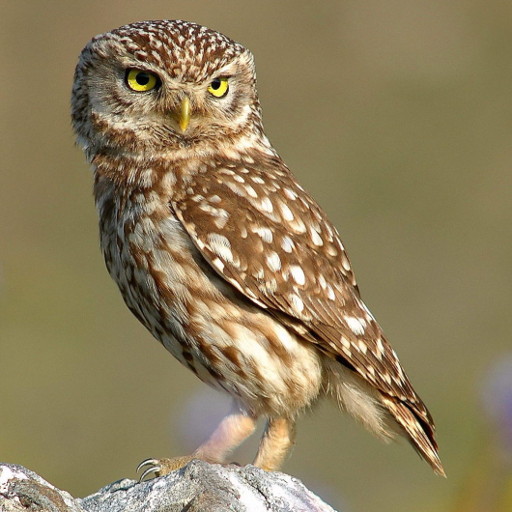 |
|---|
| 264 | /// |
|---|
| 265 | /// ```dart |
|---|
| 266 | /// const Image( |
|---|
| 267 | /// image: NetworkImage('https://flutter.github.io/assets-for-api-docs/assets/widgets/owl.jpg'), |
|---|
| 268 | /// ) |
|---|
| 269 | /// ``` |
|---|
| 270 | /// {@end-tool} |
|---|
| 271 | /// |
|---|
| 272 | /// {@tool snippet} |
|---|
| 273 | /// The [Image] Widget also provides several constructors to display different |
|---|
| 274 | /// types of images for convenience. In this example, use the [Image.network] |
|---|
| 275 | /// constructor to display an image from the internet. |
|---|
| 276 | /// |
|---|
| 277 | /// 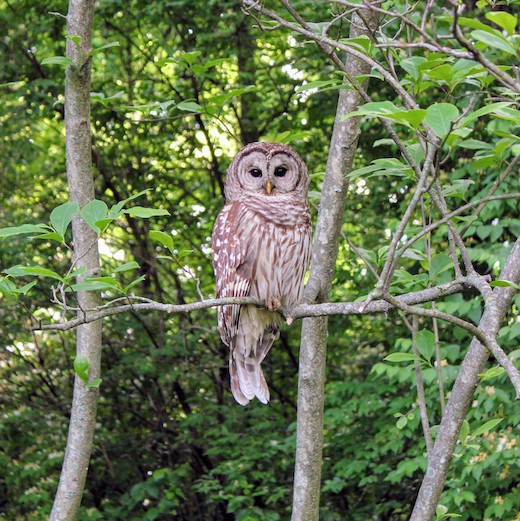 |
|---|
| 278 | /// |
|---|
| 279 | /// ```dart |
|---|
| 280 | /// Image.network('https://flutter.github.io/assets-for-api-docs/assets/widgets/owl-2.jpg') |
|---|
| 281 | /// ``` |
|---|
| 282 | /// {@end-tool} |
|---|
| 283 | /// |
|---|
| 284 | /// ## Memory usage |
|---|
| 285 | /// |
|---|
| 286 | /// The image is stored in memory in uncompressed form (so that it can be |
|---|
| 287 | /// rendered). Large images will use a lot of memory: a 4K image (3840×2160) |
|---|
| 288 | /// will use over 30MB of RAM (assuming 32 bits per pixel). |
|---|
| 289 | /// |
|---|
| 290 | /// This problem is exacerbated by the images being cached in the [ImageCache], |
|---|
| 291 | /// so large images can use memory for even longer than they are displayed. |
|---|
| 292 | /// |
|---|
| 293 | /// The [Image.asset], [Image.network], [Image.file], and [Image.memory] |
|---|
| 294 | /// constructors allow a custom decode size to be specified through `cacheWidth` |
|---|
| 295 | /// and `cacheHeight` parameters. The engine will then decode and store the |
|---|
| 296 | /// image at the specified size, instead of the image's natural size. |
|---|
| 297 | /// |
|---|
| 298 | /// This can significantly reduce the memory usage. For example, a 4K image that |
|---|
| 299 | /// will be rendered at only 384×216 pixels (one-tenth the horizontal and |
|---|
| 300 | /// vertical dimensions) would only use 330KB if those dimensions are specified |
|---|
| 301 | /// using the `cacheWidth` and `cacheHeight` parameters, a 100-fold reduction in |
|---|
| 302 | /// memory usage. |
|---|
| 303 | /// |
|---|
| 304 | /// ### Web considerations |
|---|
| 305 | /// |
|---|
| 306 | /// In the case where a network image is used on the Web platform, the |
|---|
| 307 | /// `cacheWidth` and `cacheHeight` parameters are only supported when the |
|---|
| 308 | /// application is running with the CanvasKit renderer. When the application is |
|---|
| 309 | /// using the HTML renderer, the web engine delegates image decoding of network |
|---|
| 310 | /// images to the Web, which does not support custom decode sizes. |
|---|
| 311 | /// |
|---|
| 312 | /// ## Custom image providers |
|---|
| 313 | /// |
|---|
| 314 | /// {@tool dartpad} |
|---|
| 315 | /// In this example, a variant of [NetworkImage] is created that passes all the |
|---|
| 316 | /// [ImageConfiguration] information (locale, platform, size, etc) to the server |
|---|
| 317 | /// using query arguments in the image URL. |
|---|
| 318 | /// |
|---|
| 319 | /// ** See code in examples/api/lib/painting/image_provider/image_provider.0.dart ** |
|---|
| 320 | /// {@end-tool} |
|---|
| 321 | /// |
|---|
| 322 | /// See also: |
|---|
| 323 | /// |
|---|
| 324 | /// * [Icon], which shows an image from a font. |
|---|
| 325 | /// * [Ink.image], which is the preferred way to show an image in a |
|---|
| 326 | /// material application (especially if the image is in a [Material] and will |
|---|
| 327 | /// have an [InkWell] on top of it). |
|---|
| 328 | /// * [Image](dart-ui/Image-class.html), the class in the [dart:ui] library. |
|---|
| 329 | /// * Cookbook: [Display images from the internet](https://flutter.dev/docs/cookbook/images/network-image) |
|---|
| 330 | /// * Cookbook: [Work with cached images](https://flutter.dev/docs/cookbook/images/cached-images) |
|---|
| 331 | /// * Cookbook: [Fade in images with a placeholder](https://flutter.dev/docs/cookbook/images/fading-in-images) |
|---|
| 332 | class Image extends StatefulWidget { |
|---|
| 333 | /// Creates a widget that displays an image. |
|---|
| 334 | /// |
|---|
| 335 | /// To show an image from the network or from an asset bundle, consider using |
|---|
| 336 | /// [Image.network] and [Image.asset] respectively. |
|---|
| 337 | /// |
|---|
| 338 | /// Either the [width] and [height] arguments should be specified, or the |
|---|
| 339 | /// widget should be placed in a context that sets tight layout constraints. |
|---|
| 340 | /// Otherwise, the image dimensions will change as the image is loaded, which |
|---|
| 341 | /// will result in ugly layout changes. |
|---|
| 342 | /// |
|---|
| 343 | /// {@template flutter.widgets.image.filterQualityParameter} |
|---|
| 344 | /// Use [filterQuality] to specify the rendering quality of the image. |
|---|
| 345 | /// {@endtemplate} |
|---|
| 346 | /// |
|---|
| 347 | /// If [excludeFromSemantics] is true, then [semanticLabel] will be ignored. |
|---|
| 348 | const Image({ |
|---|
| 349 | super.key, |
|---|
| 350 | required this.image, |
|---|
| 351 | this.frameBuilder, |
|---|
| 352 | this.loadingBuilder, |
|---|
| 353 | this.errorBuilder, |
|---|
| 354 | this.semanticLabel, |
|---|
| 355 | this.excludeFromSemantics = false, |
|---|
| 356 | this.width, |
|---|
| 357 | this.height, |
|---|
| 358 | this.color, |
|---|
| 359 | this.opacity, |
|---|
| 360 | this.colorBlendMode, |
|---|
| 361 | this.fit, |
|---|
| 362 | this.alignment = Alignment.center, |
|---|
| 363 | this.repeat = ImageRepeat.noRepeat, |
|---|
| 364 | this.centerSlice, |
|---|
| 365 | this.matchTextDirection = false, |
|---|
| 366 | this.gaplessPlayback = false, |
|---|
| 367 | this.isAntiAlias = false, |
|---|
| 368 | this.filterQuality = FilterQuality.low, |
|---|
| 369 | }); |
|---|
| 370 | |
|---|
| 371 | /// Creates a widget that displays an [ImageStream] obtained from the network. |
|---|
| 372 | /// |
|---|
| 373 | /// Either the [width] and [height] arguments should be specified, or the |
|---|
| 374 | /// widget should be placed in a context that sets tight layout constraints. |
|---|
| 375 | /// Otherwise, the image dimensions will change as the image is loaded, which |
|---|
| 376 | /// will result in ugly layout changes. |
|---|
| 377 | /// |
|---|
| 378 | /// All network images are cached regardless of HTTP headers. |
|---|
| 379 | /// |
|---|
| 380 | /// An optional [headers] argument can be used to send custom HTTP headers |
|---|
| 381 | /// with the image request. |
|---|
| 382 | /// |
|---|
| 383 | /// {@macro flutter.widgets.image.filterQualityParameter} |
|---|
| 384 | /// |
|---|
| 385 | /// If [excludeFromSemantics] is true, then [semanticLabel] will be ignored. |
|---|
| 386 | /// |
|---|
| 387 | /// If `cacheWidth` or `cacheHeight` are provided, they indicate to the |
|---|
| 388 | /// engine that the image should be decoded at the specified size. The image |
|---|
| 389 | /// will be rendered to the constraints of the layout or [width] and [height] |
|---|
| 390 | /// regardless of these parameters. These parameters are primarily intended |
|---|
| 391 | /// to reduce the memory usage of [ImageCache]. |
|---|
| 392 | /// |
|---|
| 393 | /// In the case where the network image is on the Web platform, the [cacheWidth] |
|---|
| 394 | /// and [cacheHeight] parameters are ignored as the web engine delegates |
|---|
| 395 | /// image decoding to the web which does not support custom decode sizes. |
|---|
| 396 | Image.network( |
|---|
| 397 | String src, { |
|---|
| 398 | super.key, |
|---|
| 399 | double scale = 1.0, |
|---|
| 400 | this.frameBuilder, |
|---|
| 401 | this.loadingBuilder, |
|---|
| 402 | this.errorBuilder, |
|---|
| 403 | this.semanticLabel, |
|---|
| 404 | this.excludeFromSemantics = false, |
|---|
| 405 | this.width, |
|---|
| 406 | this.height, |
|---|
| 407 | this.color, |
|---|
| 408 | this.opacity, |
|---|
| 409 | this.colorBlendMode, |
|---|
| 410 | this.fit, |
|---|
| 411 | this.alignment = Alignment.center, |
|---|
| 412 | this.repeat = ImageRepeat.noRepeat, |
|---|
| 413 | this.centerSlice, |
|---|
| 414 | this.matchTextDirection = false, |
|---|
| 415 | this.gaplessPlayback = false, |
|---|
| 416 | this.filterQuality = FilterQuality.low, |
|---|
| 417 | this.isAntiAlias = false, |
|---|
| 418 | Map<String, String>? headers, |
|---|
| 419 | int? cacheWidth, |
|---|
| 420 | int? cacheHeight, |
|---|
| 421 | }) : image = ResizeImage.resizeIfNeeded(cacheWidth, cacheHeight, NetworkImage(src, scale: scale, headers: headers)), |
|---|
| 422 | assert(cacheWidth == null || cacheWidth > 0), |
|---|
| 423 | assert(cacheHeight == null || cacheHeight > 0); |
|---|
| 424 | |
|---|
| 425 | /// Creates a widget that displays an [ImageStream] obtained from a [File]. |
|---|
| 426 | /// |
|---|
| 427 | /// Either the [width] and [height] arguments should be specified, or the |
|---|
| 428 | /// widget should be placed in a context that sets tight layout constraints. |
|---|
| 429 | /// Otherwise, the image dimensions will change as the image is loaded, which |
|---|
| 430 | /// will result in ugly layout changes. |
|---|
| 431 | /// |
|---|
| 432 | /// On Android, this may require the |
|---|
| 433 | /// `android.permission.READ_EXTERNAL_STORAGE` permission. |
|---|
| 434 | /// |
|---|
| 435 | /// {@macro flutter.widgets.image.filterQualityParameter} |
|---|
| 436 | /// |
|---|
| 437 | /// If [excludeFromSemantics] is true, then [semanticLabel] will be ignored. |
|---|
| 438 | /// |
|---|
| 439 | /// If `cacheWidth` or `cacheHeight` are provided, they indicate to the |
|---|
| 440 | /// engine that the image must be decoded at the specified size. The image |
|---|
| 441 | /// will be rendered to the constraints of the layout or [width] and [height] |
|---|
| 442 | /// regardless of these parameters. These parameters are primarily intended |
|---|
| 443 | /// to reduce the memory usage of [ImageCache]. |
|---|
| 444 | /// |
|---|
| 445 | /// Loading an image from a file creates an in memory copy of the file, |
|---|
| 446 | /// which is retained in the [ImageCache]. The underlying file is not |
|---|
| 447 | /// monitored for changes. If it does change, the application should evict |
|---|
| 448 | /// the entry from the [ImageCache]. |
|---|
| 449 | /// |
|---|
| 450 | /// See also: |
|---|
| 451 | /// |
|---|
| 452 | /// * [FileImage] provider for evicting the underlying file easily. |
|---|
| 453 | Image.file( |
|---|
| 454 | File file, { |
|---|
| 455 | super.key, |
|---|
| 456 | double scale = 1.0, |
|---|
| 457 | this.frameBuilder, |
|---|
| 458 | this.errorBuilder, |
|---|
| 459 | this.semanticLabel, |
|---|
| 460 | this.excludeFromSemantics = false, |
|---|
| 461 | this.width, |
|---|
| 462 | this.height, |
|---|
| 463 | this.color, |
|---|
| 464 | this.opacity, |
|---|
| 465 | this.colorBlendMode, |
|---|
| 466 | this.fit, |
|---|
| 467 | this.alignment = Alignment.center, |
|---|
| 468 | this.repeat = ImageRepeat.noRepeat, |
|---|
| 469 | this.centerSlice, |
|---|
| 470 | this.matchTextDirection = false, |
|---|
| 471 | this.gaplessPlayback = false, |
|---|
| 472 | this.isAntiAlias = false, |
|---|
| 473 | this.filterQuality = FilterQuality.low, |
|---|
| 474 | int? cacheWidth, |
|---|
| 475 | int? cacheHeight, |
|---|
| 476 | }) : |
|---|
| 477 | // FileImage is not supported on Flutter Web therefore neither this method. |
|---|
| 478 | assert( |
|---|
| 479 | !kIsWeb, |
|---|
| 480 | 'Image.file is not supported on Flutter Web. ' |
|---|
| 481 | 'Consider using either Image.asset or Image.network instead.' , |
|---|
| 482 | ), |
|---|
| 483 | image = ResizeImage.resizeIfNeeded(cacheWidth, cacheHeight, FileImage(file, scale: scale)), |
|---|
| 484 | loadingBuilder = null, |
|---|
| 485 | assert(cacheWidth == null || cacheWidth > 0), |
|---|
| 486 | assert(cacheHeight == null || cacheHeight > 0); |
|---|
| 487 | |
|---|
| 488 | // TODO(ianh): Implement the following (see ../services/image_resolution.dart): |
|---|
| 489 | // |
|---|
| 490 | // * If [width] and [height] are both specified, and [scale] is not, then |
|---|
| 491 | // size-aware asset resolution will be attempted also, with the given |
|---|
| 492 | // dimensions interpreted as logical pixels. |
|---|
| 493 | // |
|---|
| 494 | // * If the images have platform, locale, or directionality variants, the |
|---|
| 495 | // current platform, locale, and directionality are taken into account |
|---|
| 496 | // during asset resolution as well. |
|---|
| 497 | /// Creates a widget that displays an [ImageStream] obtained from an asset |
|---|
| 498 | /// bundle. The key for the image is given by the `name` argument. |
|---|
| 499 | /// |
|---|
| 500 | /// The `package` argument must be non-null when displaying an image from a |
|---|
| 501 | /// package and null otherwise. See the `Assets in packages` section for |
|---|
| 502 | /// details. |
|---|
| 503 | /// |
|---|
| 504 | /// If the `bundle` argument is omitted or null, then the |
|---|
| 505 | /// [DefaultAssetBundle] will be used. |
|---|
| 506 | /// |
|---|
| 507 | /// By default, the pixel-density-aware asset resolution will be attempted. In |
|---|
| 508 | /// addition: |
|---|
| 509 | /// |
|---|
| 510 | /// * If the `scale` argument is provided and is not null, then the exact |
|---|
| 511 | /// asset specified will be used. To display an image variant with a specific |
|---|
| 512 | /// density, the exact path must be provided (e.g. `images/2x/cat.png`). |
|---|
| 513 | /// |
|---|
| 514 | /// If [excludeFromSemantics] is true, then [semanticLabel] will be ignored. |
|---|
| 515 | /// |
|---|
| 516 | /// If `cacheWidth` or `cacheHeight` are provided, they indicate to the |
|---|
| 517 | /// engine that the image must be decoded at the specified size. The image |
|---|
| 518 | /// will be rendered to the constraints of the layout or [width] and [height] |
|---|
| 519 | /// regardless of these parameters. These parameters are primarily intended |
|---|
| 520 | /// to reduce the memory usage of [ImageCache]. |
|---|
| 521 | /// |
|---|
| 522 | /// Either the [width] and [height] arguments should be specified, or the |
|---|
| 523 | /// widget should be placed in a context that sets tight layout constraints. |
|---|
| 524 | /// Otherwise, the image dimensions will change as the image is loaded, which |
|---|
| 525 | /// will result in ugly layout changes. |
|---|
| 526 | /// |
|---|
| 527 | /// {@macro flutter.widgets.image.filterQualityParameter} |
|---|
| 528 | /// |
|---|
| 529 | /// {@tool snippet} |
|---|
| 530 | /// |
|---|
| 531 | /// Suppose that the project's `pubspec.yaml` file contains the following: |
|---|
| 532 | /// |
|---|
| 533 | /// ```yaml |
|---|
| 534 | /// flutter: |
|---|
| 535 | /// assets: |
|---|
| 536 | /// - images/cat.png |
|---|
| 537 | /// - images/2x/cat.png |
|---|
| 538 | /// - images/3.5x/cat.png |
|---|
| 539 | /// ``` |
|---|
| 540 | /// {@end-tool} |
|---|
| 541 | /// |
|---|
| 542 | /// On a screen with a device pixel ratio of 2.0, the following widget would |
|---|
| 543 | /// render the `images/2x/cat.png` file: |
|---|
| 544 | /// |
|---|
| 545 | /// ```dart |
|---|
| 546 | /// Image.asset('images/cat.png') |
|---|
| 547 | /// ``` |
|---|
| 548 | /// |
|---|
| 549 | /// This corresponds to the file that is in the project's `images/2x/` |
|---|
| 550 | /// directory with the name `cat.png` (the paths are relative to the |
|---|
| 551 | /// `pubspec.yaml` file). |
|---|
| 552 | /// |
|---|
| 553 | /// On a device with a 4.0 device pixel ratio, the `images/3.5x/cat.png` asset |
|---|
| 554 | /// would be used. On a device with a 1.0 device pixel ratio, the |
|---|
| 555 | /// `images/cat.png` resource would be used. |
|---|
| 556 | /// |
|---|
| 557 | /// The `images/cat.png` image can be omitted from disk (though it must still |
|---|
| 558 | /// be present in the manifest). If it is omitted, then on a device with a 1.0 |
|---|
| 559 | /// device pixel ratio, the `images/2x/cat.png` image would be used instead. |
|---|
| 560 | /// |
|---|
| 561 | /// |
|---|
| 562 | /// ## Assets in packages |
|---|
| 563 | /// |
|---|
| 564 | /// To create the widget with an asset from a package, the [package] argument |
|---|
| 565 | /// must be provided. For instance, suppose a package called `my_icons` has |
|---|
| 566 | /// `icons/heart.png` . |
|---|
| 567 | /// |
|---|
| 568 | /// {@tool snippet} |
|---|
| 569 | /// Then to display the image, use: |
|---|
| 570 | /// |
|---|
| 571 | /// ```dart |
|---|
| 572 | /// Image.asset('icons/heart.png', package: 'my_icons') |
|---|
| 573 | /// ``` |
|---|
| 574 | /// {@end-tool} |
|---|
| 575 | /// |
|---|
| 576 | /// Assets used by the package itself should also be displayed using the |
|---|
| 577 | /// [package] argument as above. |
|---|
| 578 | /// |
|---|
| 579 | /// If the desired asset is specified in the `pubspec.yaml` of the package, it |
|---|
| 580 | /// is bundled automatically with the app. In particular, assets used by the |
|---|
| 581 | /// package itself must be specified in its `pubspec.yaml`. |
|---|
| 582 | /// |
|---|
| 583 | /// A package can also choose to have assets in its 'lib/' folder that are not |
|---|
| 584 | /// specified in its `pubspec.yaml`. In this case for those images to be |
|---|
| 585 | /// bundled, the app has to specify which ones to include. For instance a |
|---|
| 586 | /// package named `fancy_backgrounds` could have: |
|---|
| 587 | /// |
|---|
| 588 | /// lib/backgrounds/background1.png |
|---|
| 589 | /// lib/backgrounds/background2.png |
|---|
| 590 | /// lib/backgrounds/background3.png |
|---|
| 591 | /// |
|---|
| 592 | /// To include, say the first image, the `pubspec.yaml` of the app should |
|---|
| 593 | /// specify it in the assets section: |
|---|
| 594 | /// |
|---|
| 595 | /// ```yaml |
|---|
| 596 | /// assets: |
|---|
| 597 | /// - packages/fancy_backgrounds/backgrounds/background1.png |
|---|
| 598 | /// ``` |
|---|
| 599 | /// |
|---|
| 600 | /// The `lib/` is implied, so it should not be included in the asset path. |
|---|
| 601 | /// |
|---|
| 602 | /// |
|---|
| 603 | /// See also: |
|---|
| 604 | /// |
|---|
| 605 | /// * [AssetImage], which is used to implement the behavior when the scale is |
|---|
| 606 | /// omitted. |
|---|
| 607 | /// * [ExactAssetImage], which is used to implement the behavior when the |
|---|
| 608 | /// scale is present. |
|---|
| 609 | /// * <https://flutter.dev/assets-and-images/>, an introduction to assets in |
|---|
| 610 | /// Flutter. |
|---|
| 611 | Image.asset( |
|---|
| 612 | String name, { |
|---|
| 613 | super.key, |
|---|
| 614 | AssetBundle? bundle, |
|---|
| 615 | this.frameBuilder, |
|---|
| 616 | this.errorBuilder, |
|---|
| 617 | this.semanticLabel, |
|---|
| 618 | this.excludeFromSemantics = false, |
|---|
| 619 | double? scale, |
|---|
| 620 | this.width, |
|---|
| 621 | this.height, |
|---|
| 622 | this.color, |
|---|
| 623 | this.opacity, |
|---|
| 624 | this.colorBlendMode, |
|---|
| 625 | this.fit, |
|---|
| 626 | this.alignment = Alignment.center, |
|---|
| 627 | this.repeat = ImageRepeat.noRepeat, |
|---|
| 628 | this.centerSlice, |
|---|
| 629 | this.matchTextDirection = false, |
|---|
| 630 | this.gaplessPlayback = false, |
|---|
| 631 | this.isAntiAlias = false, |
|---|
| 632 | String? package, |
|---|
| 633 | this.filterQuality = FilterQuality.low, |
|---|
| 634 | int? cacheWidth, |
|---|
| 635 | int? cacheHeight, |
|---|
| 636 | }) : image = ResizeImage.resizeIfNeeded( |
|---|
| 637 | cacheWidth, |
|---|
| 638 | cacheHeight, |
|---|
| 639 | scale != null |
|---|
| 640 | ? ExactAssetImage(name, bundle: bundle, scale: scale, package: package) |
|---|
| 641 | : AssetImage(name, bundle: bundle, package: package), |
|---|
| 642 | ), |
|---|
| 643 | loadingBuilder = null, |
|---|
| 644 | assert(cacheWidth == null || cacheWidth > 0), |
|---|
| 645 | assert(cacheHeight == null || cacheHeight > 0); |
|---|
| 646 | |
|---|
| 647 | /// Creates a widget that displays an [ImageStream] obtained from a [Uint8List]. |
|---|
| 648 | /// |
|---|
| 649 | /// The `bytes` argument specifies encoded image bytes, which can be encoded |
|---|
| 650 | /// in any of the following supported image formats: |
|---|
| 651 | /// {@macro dart.ui.imageFormats} |
|---|
| 652 | /// |
|---|
| 653 | /// The `scale` argument specifies the linear scale factor for drawing this |
|---|
| 654 | /// image at its intended size and applies to both the width and the height. |
|---|
| 655 | /// {@macro flutter.painting.imageInfo.scale} |
|---|
| 656 | /// |
|---|
| 657 | /// This only accepts compressed image formats (e.g. PNG). Uncompressed |
|---|
| 658 | /// formats like rawRgba (the default format of [dart:ui.Image.toByteData]) |
|---|
| 659 | /// will lead to exceptions. |
|---|
| 660 | /// |
|---|
| 661 | /// Either the [width] and [height] arguments should be specified, or the |
|---|
| 662 | /// widget should be placed in a context that sets tight layout constraints. |
|---|
| 663 | /// Otherwise, the image dimensions will change as the image is loaded, which |
|---|
| 664 | /// will result in ugly layout changes. |
|---|
| 665 | /// |
|---|
| 666 | /// {@macro flutter.widgets.image.filterQualityParameter} |
|---|
| 667 | /// |
|---|
| 668 | /// If [excludeFromSemantics] is true, then [semanticLabel] will be ignored. |
|---|
| 669 | /// |
|---|
| 670 | /// If `cacheWidth` or `cacheHeight` are provided, they indicate to the |
|---|
| 671 | /// engine that the image must be decoded at the specified size. The image |
|---|
| 672 | /// will be rendered to the constraints of the layout or [width] and [height] |
|---|
| 673 | /// regardless of these parameters. These parameters are primarily intended |
|---|
| 674 | /// to reduce the memory usage of [ImageCache]. |
|---|
| 675 | Image.memory( |
|---|
| 676 | Uint8List bytes, { |
|---|
| 677 | super.key, |
|---|
| 678 | double scale = 1.0, |
|---|
| 679 | this.frameBuilder, |
|---|
| 680 | this.errorBuilder, |
|---|
| 681 | this.semanticLabel, |
|---|
| 682 | this.excludeFromSemantics = false, |
|---|
| 683 | this.width, |
|---|
| 684 | this.height, |
|---|
| 685 | this.color, |
|---|
| 686 | this.opacity, |
|---|
| 687 | this.colorBlendMode, |
|---|
| 688 | this.fit, |
|---|
| 689 | this.alignment = Alignment.center, |
|---|
| 690 | this.repeat = ImageRepeat.noRepeat, |
|---|
| 691 | this.centerSlice, |
|---|
| 692 | this.matchTextDirection = false, |
|---|
| 693 | this.gaplessPlayback = false, |
|---|
| 694 | this.isAntiAlias = false, |
|---|
| 695 | this.filterQuality = FilterQuality.low, |
|---|
| 696 | int? cacheWidth, |
|---|
| 697 | int? cacheHeight, |
|---|
| 698 | }) : image = ResizeImage.resizeIfNeeded(cacheWidth, cacheHeight, MemoryImage(bytes, scale: scale)), |
|---|
| 699 | loadingBuilder = null, |
|---|
| 700 | assert(cacheWidth == null || cacheWidth > 0), |
|---|
| 701 | assert(cacheHeight == null || cacheHeight > 0); |
|---|
| 702 | |
|---|
| 703 | /// The image to display. |
|---|
| 704 | final ImageProvider image; |
|---|
| 705 | |
|---|
| 706 | /// A builder function responsible for creating the widget that represents |
|---|
| 707 | /// this image. |
|---|
| 708 | /// |
|---|
| 709 | /// If this is null, this widget will display an image that is painted as |
|---|
| 710 | /// soon as the first image frame is available (and will appear to "pop" in |
|---|
| 711 | /// if it becomes available asynchronously). Callers might use this builder to |
|---|
| 712 | /// add effects to the image (such as fading the image in when it becomes |
|---|
| 713 | /// available) or to display a placeholder widget while the image is loading. |
|---|
| 714 | /// |
|---|
| 715 | /// To have finer-grained control over the way that an image's loading |
|---|
| 716 | /// progress is communicated to the user, see [loadingBuilder]. |
|---|
| 717 | /// |
|---|
| 718 | /// ## Chaining with [loadingBuilder] |
|---|
| 719 | /// |
|---|
| 720 | /// If a [loadingBuilder] has _also_ been specified for an image, the two |
|---|
| 721 | /// builders will be chained together: the _result_ of this builder will |
|---|
| 722 | /// be passed as the `child` argument to the [loadingBuilder]. For example, |
|---|
| 723 | /// consider the following builders used in conjunction: |
|---|
| 724 | /// |
|---|
| 725 | /// {@template flutter.widgets.Image.frameBuilder.chainedBuildersExample} |
|---|
| 726 | /// ```dart |
|---|
| 727 | /// Image( |
|---|
| 728 | /// image: _image, |
|---|
| 729 | /// frameBuilder: (BuildContext context, Widget child, int? frame, bool? wasSynchronouslyLoaded) { |
|---|
| 730 | /// return Padding( |
|---|
| 731 | /// padding: const EdgeInsets.all(8.0), |
|---|
| 732 | /// child: child, |
|---|
| 733 | /// ); |
|---|
| 734 | /// }, |
|---|
| 735 | /// loadingBuilder: (BuildContext context, Widget child, ImageChunkEvent? loadingProgress) { |
|---|
| 736 | /// return Center(child: child); |
|---|
| 737 | /// }, |
|---|
| 738 | /// ) |
|---|
| 739 | /// ``` |
|---|
| 740 | /// |
|---|
| 741 | /// In this example, the widget hierarchy will contain the following: |
|---|
| 742 | /// |
|---|
| 743 | /// ```dart |
|---|
| 744 | /// Center( |
|---|
| 745 | /// child: Padding( |
|---|
| 746 | /// padding: const EdgeInsets.all(8.0), |
|---|
| 747 | /// child: image, |
|---|
| 748 | /// ), |
|---|
| 749 | /// ), |
|---|
| 750 | /// ``` |
|---|
| 751 | /// {@endtemplate} |
|---|
| 752 | /// |
|---|
| 753 | /// {@tool dartpad} |
|---|
| 754 | /// The following sample demonstrates how to use this builder to implement an |
|---|
| 755 | /// image that fades in once it's been loaded. |
|---|
| 756 | /// |
|---|
| 757 | /// This sample contains a limited subset of the functionality that the |
|---|
| 758 | /// [FadeInImage] widget provides out of the box. |
|---|
| 759 | /// |
|---|
| 760 | /// ** See code in examples/api/lib/widgets/image/image.frame_builder.0.dart ** |
|---|
| 761 | /// {@end-tool} |
|---|
| 762 | final ImageFrameBuilder? frameBuilder; |
|---|
| 763 | |
|---|
| 764 | /// A builder that specifies the widget to display to the user while an image |
|---|
| 765 | /// is still loading. |
|---|
| 766 | /// |
|---|
| 767 | /// If this is null, and the image is loaded incrementally (e.g. over a |
|---|
| 768 | /// network), the user will receive no indication of the progress as the |
|---|
| 769 | /// bytes of the image are loaded. |
|---|
| 770 | /// |
|---|
| 771 | /// For more information on how to interpret the arguments that are passed to |
|---|
| 772 | /// this builder, see the documentation on [ImageLoadingBuilder]. |
|---|
| 773 | /// |
|---|
| 774 | /// ## Performance implications |
|---|
| 775 | /// |
|---|
| 776 | /// If a [loadingBuilder] is specified for an image, the [Image] widget is |
|---|
| 777 | /// likely to be rebuilt on every |
|---|
| 778 | /// [rendering pipeline frame](rendering/RendererBinding/drawFrame.html) until |
|---|
| 779 | /// the image has loaded. This is useful for cases such as displaying a loading |
|---|
| 780 | /// progress indicator, but for simpler cases such as displaying a placeholder |
|---|
| 781 | /// widget that doesn't depend on the loading progress (e.g. static "loading" |
|---|
| 782 | /// text), [frameBuilder] will likely work and not incur as much cost. |
|---|
| 783 | /// |
|---|
| 784 | /// ## Chaining with [frameBuilder] |
|---|
| 785 | /// |
|---|
| 786 | /// If a [frameBuilder] has _also_ been specified for an image, the two |
|---|
| 787 | /// builders will be chained together: the `child` argument to this |
|---|
| 788 | /// builder will contain the _result_ of the [frameBuilder]. For example, |
|---|
| 789 | /// consider the following builders used in conjunction: |
|---|
| 790 | /// |
|---|
| 791 | /// {@macro flutter.widgets.Image.frameBuilder.chainedBuildersExample} |
|---|
| 792 | /// |
|---|
| 793 | /// {@tool dartpad} |
|---|
| 794 | /// The following sample uses [loadingBuilder] to show a |
|---|
| 795 | /// [CircularProgressIndicator] while an image loads over the network. |
|---|
| 796 | /// |
|---|
| 797 | /// ** See code in examples/api/lib/widgets/image/image.loading_builder.0.dart ** |
|---|
| 798 | /// {@end-tool} |
|---|
| 799 | /// |
|---|
| 800 | /// Run against a real-world image on a slow network, the previous example |
|---|
| 801 | /// renders the following loading progress indicator while the image loads |
|---|
| 802 | /// before rendering the completed image. |
|---|
| 803 | /// |
|---|
| 804 | /// {@animation 400 400 https://flutter.github.io/assets-for-api-docs/assets/widgets/loading_progress_image.mp4} |
|---|
| 805 | final ImageLoadingBuilder? loadingBuilder; |
|---|
| 806 | |
|---|
| 807 | /// A builder function that is called if an error occurs during image loading. |
|---|
| 808 | /// |
|---|
| 809 | /// If this builder is not provided, any exceptions will be reported to |
|---|
| 810 | /// [FlutterError.onError]. If it is provided, the caller should either handle |
|---|
| 811 | /// the exception by providing a replacement widget, or rethrow the exception. |
|---|
| 812 | /// |
|---|
| 813 | /// {@tool dartpad} |
|---|
| 814 | /// The following sample uses [errorBuilder] to show a '😢' in place of the |
|---|
| 815 | /// image that fails to load, and prints the error to the console. |
|---|
| 816 | /// |
|---|
| 817 | /// ** See code in examples/api/lib/widgets/image/image.error_builder.0.dart ** |
|---|
| 818 | /// {@end-tool} |
|---|
| 819 | final ImageErrorWidgetBuilder? errorBuilder; |
|---|
| 820 | |
|---|
| 821 | /// If non-null, require the image to have this width (in logical pixels). |
|---|
| 822 | /// |
|---|
| 823 | /// If null, the image will pick a size that best preserves its intrinsic |
|---|
| 824 | /// aspect ratio. |
|---|
| 825 | /// |
|---|
| 826 | /// It is strongly recommended that either both the [width] and the [height] |
|---|
| 827 | /// be specified, or that the widget be placed in a context that sets tight |
|---|
| 828 | /// layout constraints, so that the image does not change size as it loads. |
|---|
| 829 | /// Consider using [fit] to adapt the image's rendering to fit the given width |
|---|
| 830 | /// and height if the exact image dimensions are not known in advance. |
|---|
| 831 | final double? width; |
|---|
| 832 | |
|---|
| 833 | /// If non-null, require the image to have this height (in logical pixels). |
|---|
| 834 | /// |
|---|
| 835 | /// If null, the image will pick a size that best preserves its intrinsic |
|---|
| 836 | /// aspect ratio. |
|---|
| 837 | /// |
|---|
| 838 | /// It is strongly recommended that either both the [width] and the [height] |
|---|
| 839 | /// be specified, or that the widget be placed in a context that sets tight |
|---|
| 840 | /// layout constraints, so that the image does not change size as it loads. |
|---|
| 841 | /// Consider using [fit] to adapt the image's rendering to fit the given width |
|---|
| 842 | /// and height if the exact image dimensions are not known in advance. |
|---|
| 843 | final double? height; |
|---|
| 844 | |
|---|
| 845 | /// If non-null, this color is blended with each image pixel using [colorBlendMode]. |
|---|
| 846 | final Color? color; |
|---|
| 847 | |
|---|
| 848 | /// If non-null, the value from the [Animation] is multiplied with the opacity |
|---|
| 849 | /// of each image pixel before painting onto the canvas. |
|---|
| 850 | /// |
|---|
| 851 | /// This is more efficient than using [FadeTransition] to change the opacity |
|---|
| 852 | /// of an image, since this avoids creating a new composited layer. Composited |
|---|
| 853 | /// layers may double memory usage as the image is painted onto an offscreen |
|---|
| 854 | /// render target. |
|---|
| 855 | /// |
|---|
| 856 | /// See also: |
|---|
| 857 | /// |
|---|
| 858 | /// * [AlwaysStoppedAnimation], which allows you to create an [Animation] |
|---|
| 859 | /// from a single opacity value. |
|---|
| 860 | final Animation<double>? opacity; |
|---|
| 861 | |
|---|
| 862 | /// The rendering quality of the image. |
|---|
| 863 | /// |
|---|
| 864 | /// {@template flutter.widgets.image.filterQuality} |
|---|
| 865 | /// If the image is of a high quality and its pixels are perfectly aligned |
|---|
| 866 | /// with the physical screen pixels, extra quality enhancement may not be |
|---|
| 867 | /// necessary. If so, then [FilterQuality.none] would be the most efficient. |
|---|
| 868 | /// |
|---|
| 869 | /// If the pixels are not perfectly aligned with the screen pixels, or if the |
|---|
| 870 | /// image itself is of a low quality, [FilterQuality.none] may produce |
|---|
| 871 | /// undesirable artifacts. Consider using other [FilterQuality] values to |
|---|
| 872 | /// improve the rendered image quality in this case. Pixels may be misaligned |
|---|
| 873 | /// with the screen pixels as a result of transforms or scaling. |
|---|
| 874 | /// |
|---|
| 875 | /// See also: |
|---|
| 876 | /// |
|---|
| 877 | /// * [FilterQuality], the enum containing all possible filter quality |
|---|
| 878 | /// options. |
|---|
| 879 | /// {@endtemplate} |
|---|
| 880 | final FilterQuality filterQuality; |
|---|
| 881 | |
|---|
| 882 | /// Used to combine [color] with this image. |
|---|
| 883 | /// |
|---|
| 884 | /// The default is [BlendMode.srcIn]. In terms of the blend mode, [color] is |
|---|
| 885 | /// the source and this image is the destination. |
|---|
| 886 | /// |
|---|
| 887 | /// See also: |
|---|
| 888 | /// |
|---|
| 889 | /// * [BlendMode], which includes an illustration of the effect of each blend mode. |
|---|
| 890 | final BlendMode? colorBlendMode; |
|---|
| 891 | |
|---|
| 892 | /// How to inscribe the image into the space allocated during layout. |
|---|
| 893 | /// |
|---|
| 894 | /// The default varies based on the other fields. See the discussion at |
|---|
| 895 | /// [paintImage]. |
|---|
| 896 | final BoxFit? fit; |
|---|
| 897 | |
|---|
| 898 | /// How to align the image within its bounds. |
|---|
| 899 | /// |
|---|
| 900 | /// The alignment aligns the given position in the image to the given position |
|---|
| 901 | /// in the layout bounds. For example, an [Alignment] alignment of (-1.0, |
|---|
| 902 | /// -1.0) aligns the image to the top-left corner of its layout bounds, while an |
|---|
| 903 | /// [Alignment] alignment of (1.0, 1.0) aligns the bottom right of the |
|---|
| 904 | /// image with the bottom right corner of its layout bounds. Similarly, an |
|---|
| 905 | /// alignment of (0.0, 1.0) aligns the bottom middle of the image with the |
|---|
| 906 | /// middle of the bottom edge of its layout bounds. |
|---|
| 907 | /// |
|---|
| 908 | /// To display a subpart of an image, consider using a [CustomPainter] and |
|---|
| 909 | /// [Canvas.drawImageRect]. |
|---|
| 910 | /// |
|---|
| 911 | /// If the [alignment] is [TextDirection]-dependent (i.e. if it is a |
|---|
| 912 | /// [AlignmentDirectional]), then an ambient [Directionality] widget |
|---|
| 913 | /// must be in scope. |
|---|
| 914 | /// |
|---|
| 915 | /// Defaults to [Alignment.center]. |
|---|
| 916 | /// |
|---|
| 917 | /// See also: |
|---|
| 918 | /// |
|---|
| 919 | /// * [Alignment], a class with convenient constants typically used to |
|---|
| 920 | /// specify an [AlignmentGeometry]. |
|---|
| 921 | /// * [AlignmentDirectional], like [Alignment] for specifying alignments |
|---|
| 922 | /// relative to text direction. |
|---|
| 923 | final AlignmentGeometry alignment; |
|---|
| 924 | |
|---|
| 925 | /// How to paint any portions of the layout bounds not covered by the image. |
|---|
| 926 | final ImageRepeat repeat; |
|---|
| 927 | |
|---|
| 928 | /// The center slice for a nine-patch image. |
|---|
| 929 | /// |
|---|
| 930 | /// The region of the image inside the center slice will be stretched both |
|---|
| 931 | /// horizontally and vertically to fit the image into its destination. The |
|---|
| 932 | /// region of the image above and below the center slice will be stretched |
|---|
| 933 | /// only horizontally and the region of the image to the left and right of |
|---|
| 934 | /// the center slice will be stretched only vertically. |
|---|
| 935 | final Rect? centerSlice; |
|---|
| 936 | |
|---|
| 937 | /// Whether to paint the image in the direction of the [TextDirection]. |
|---|
| 938 | /// |
|---|
| 939 | /// If this is true, then in [TextDirection.ltr] contexts, the image will be |
|---|
| 940 | /// drawn with its origin in the top left (the "normal" painting direction for |
|---|
| 941 | /// images); and in [TextDirection.rtl] contexts, the image will be drawn with |
|---|
| 942 | /// a scaling factor of -1 in the horizontal direction so that the origin is |
|---|
| 943 | /// in the top right. |
|---|
| 944 | /// |
|---|
| 945 | /// This is occasionally used with images in right-to-left environments, for |
|---|
| 946 | /// images that were designed for left-to-right locales. Be careful, when |
|---|
| 947 | /// using this, to not flip images with integral shadows, text, or other |
|---|
| 948 | /// effects that will look incorrect when flipped. |
|---|
| 949 | /// |
|---|
| 950 | /// If this is true, there must be an ambient [Directionality] widget in |
|---|
| 951 | /// scope. |
|---|
| 952 | final bool matchTextDirection; |
|---|
| 953 | |
|---|
| 954 | /// Whether to continue showing the old image (true), or briefly show nothing |
|---|
| 955 | /// (false), when the image provider changes. The default value is false. |
|---|
| 956 | /// |
|---|
| 957 | /// ## Design discussion |
|---|
| 958 | /// |
|---|
| 959 | /// ### Why is the default value of [gaplessPlayback] false? |
|---|
| 960 | /// |
|---|
| 961 | /// Having the default value of [gaplessPlayback] be false helps prevent |
|---|
| 962 | /// situations where stale or misleading information might be presented. |
|---|
| 963 | /// Consider the following case: |
|---|
| 964 | /// |
|---|
| 965 | /// We have constructed a 'Person' widget that displays an avatar [Image] of |
|---|
| 966 | /// the currently loaded person along with their name. We could request for a |
|---|
| 967 | /// new person to be loaded into the widget at any time. Suppose we have a |
|---|
| 968 | /// person currently loaded and the widget loads a new person. What happens |
|---|
| 969 | /// if the [Image] fails to load? |
|---|
| 970 | /// |
|---|
| 971 | /// * Option A ([gaplessPlayback] = false): The new person's name is coupled |
|---|
| 972 | /// with a blank image. |
|---|
| 973 | /// |
|---|
| 974 | /// * Option B ([gaplessPlayback] = true): The widget displays the avatar of |
|---|
| 975 | /// the previous person and the name of the newly loaded person. |
|---|
| 976 | /// |
|---|
| 977 | /// This is why the default value is false. Most of the time, when you change |
|---|
| 978 | /// the image provider you're not just changing the image, you're removing the |
|---|
| 979 | /// old widget and adding a new one and not expecting them to have any |
|---|
| 980 | /// relationship. With [gaplessPlayback] on you might accidentally break this |
|---|
| 981 | /// expectation and re-use the old widget. |
|---|
| 982 | final bool gaplessPlayback; |
|---|
| 983 | |
|---|
| 984 | /// A Semantic description of the image. |
|---|
| 985 | /// |
|---|
| 986 | /// Used to provide a description of the image to TalkBack on Android, and |
|---|
| 987 | /// VoiceOver on iOS. |
|---|
| 988 | final String? semanticLabel; |
|---|
| 989 | |
|---|
| 990 | /// Whether to exclude this image from semantics. |
|---|
| 991 | /// |
|---|
| 992 | /// Useful for images which do not contribute meaningful information to an |
|---|
| 993 | /// application. |
|---|
| 994 | final bool excludeFromSemantics; |
|---|
| 995 | |
|---|
| 996 | /// Whether to paint the image with anti-aliasing. |
|---|
| 997 | /// |
|---|
| 998 | /// Anti-aliasing alleviates the sawtooth artifact when the image is rotated. |
|---|
| 999 | final bool isAntiAlias; |
|---|
| 1000 | |
|---|
| 1001 | @override |
|---|
| 1002 | State<Image> createState() => _ImageState(); |
|---|
| 1003 | |
|---|
| 1004 | @override |
|---|
| 1005 | void debugFillProperties(DiagnosticPropertiesBuilder properties) { |
|---|
| 1006 | super.debugFillProperties(properties); |
|---|
| 1007 | properties.add(DiagnosticsProperty<ImageProvider>('image' , image)); |
|---|
| 1008 | properties.add(DiagnosticsProperty<Function>('frameBuilder' , frameBuilder)); |
|---|
| 1009 | properties.add(DiagnosticsProperty<Function>('loadingBuilder' , loadingBuilder)); |
|---|
| 1010 | properties.add(DoubleProperty('width' , width, defaultValue: null)); |
|---|
| 1011 | properties.add(DoubleProperty('height' , height, defaultValue: null)); |
|---|
| 1012 | properties.add(ColorProperty('color' , color, defaultValue: null)); |
|---|
| 1013 | properties.add(DiagnosticsProperty<Animation<double>?>('opacity' , opacity, defaultValue: null)); |
|---|
| 1014 | properties.add(EnumProperty<BlendMode>('colorBlendMode' , colorBlendMode, defaultValue: null)); |
|---|
| 1015 | properties.add(EnumProperty<BoxFit>('fit' , fit, defaultValue: null)); |
|---|
| 1016 | properties.add(DiagnosticsProperty<AlignmentGeometry>('alignment' , alignment, defaultValue: null)); |
|---|
| 1017 | properties.add(EnumProperty<ImageRepeat>('repeat' , repeat, defaultValue: ImageRepeat.noRepeat)); |
|---|
| 1018 | properties.add(DiagnosticsProperty<Rect>('centerSlice' , centerSlice, defaultValue: null)); |
|---|
| 1019 | properties.add(FlagProperty('matchTextDirection' , value: matchTextDirection, ifTrue: 'match text direction' )); |
|---|
| 1020 | properties.add(StringProperty('semanticLabel' , semanticLabel, defaultValue: null)); |
|---|
| 1021 | properties.add(DiagnosticsProperty<bool>('this.excludeFromSemantics' , excludeFromSemantics)); |
|---|
| 1022 | properties.add(EnumProperty<FilterQuality>('filterQuality' , filterQuality)); |
|---|
| 1023 | } |
|---|
| 1024 | } |
|---|
| 1025 | |
|---|
| 1026 | class _ImageState extends State<Image> with WidgetsBindingObserver { |
|---|
| 1027 | ImageStream? _imageStream; |
|---|
| 1028 | ImageInfo? _imageInfo; |
|---|
| 1029 | ImageChunkEvent? _loadingProgress; |
|---|
| 1030 | bool _isListeningToStream = false; |
|---|
| 1031 | late bool _invertColors; |
|---|
| 1032 | int? _frameNumber; |
|---|
| 1033 | bool _wasSynchronouslyLoaded = false; |
|---|
| 1034 | late DisposableBuildContext<State<Image>> _scrollAwareContext; |
|---|
| 1035 | Object? _lastException; |
|---|
| 1036 | StackTrace? _lastStack; |
|---|
| 1037 | ImageStreamCompleterHandle? _completerHandle; |
|---|
| 1038 | |
|---|
| 1039 | @override |
|---|
| 1040 | void initState() { |
|---|
| 1041 | super.initState(); |
|---|
| 1042 | WidgetsBinding.instance.addObserver(this); |
|---|
| 1043 | _scrollAwareContext = DisposableBuildContext<State<Image>>(this); |
|---|
| 1044 | } |
|---|
| 1045 | |
|---|
| 1046 | @override |
|---|
| 1047 | void dispose() { |
|---|
| 1048 | assert(_imageStream != null); |
|---|
| 1049 | WidgetsBinding.instance.removeObserver(this); |
|---|
| 1050 | _stopListeningToStream(); |
|---|
| 1051 | _completerHandle?.dispose(); |
|---|
| 1052 | _scrollAwareContext.dispose(); |
|---|
| 1053 | _replaceImage(info: null); |
|---|
| 1054 | super.dispose(); |
|---|
| 1055 | } |
|---|
| 1056 | |
|---|
| 1057 | @override |
|---|
| 1058 | void didChangeDependencies() { |
|---|
| 1059 | _updateInvertColors(); |
|---|
| 1060 | _resolveImage(); |
|---|
| 1061 | |
|---|
| 1062 | if (TickerMode.of(context)) { |
|---|
| 1063 | _listenToStream(); |
|---|
| 1064 | } else { |
|---|
| 1065 | _stopListeningToStream(keepStreamAlive: true); |
|---|
| 1066 | } |
|---|
| 1067 | |
|---|
| 1068 | super.didChangeDependencies(); |
|---|
| 1069 | } |
|---|
| 1070 | |
|---|
| 1071 | @override |
|---|
| 1072 | void didUpdateWidget(Image oldWidget) { |
|---|
| 1073 | super.didUpdateWidget(oldWidget); |
|---|
| 1074 | if (_isListeningToStream && |
|---|
| 1075 | (widget.loadingBuilder == null) != (oldWidget.loadingBuilder == null)) { |
|---|
| 1076 | final ImageStreamListener oldListener = _getListener(); |
|---|
| 1077 | _imageStream!.addListener(_getListener(recreateListener: true)); |
|---|
| 1078 | _imageStream!.removeListener(oldListener); |
|---|
| 1079 | } |
|---|
| 1080 | if (widget.image != oldWidget.image) { |
|---|
| 1081 | _resolveImage(); |
|---|
| 1082 | } |
|---|
| 1083 | } |
|---|
| 1084 | |
|---|
| 1085 | @override |
|---|
| 1086 | void didChangeAccessibilityFeatures() { |
|---|
| 1087 | super.didChangeAccessibilityFeatures(); |
|---|
| 1088 | setState(() { |
|---|
| 1089 | _updateInvertColors(); |
|---|
| 1090 | }); |
|---|
| 1091 | } |
|---|
| 1092 | |
|---|
| 1093 | @override |
|---|
| 1094 | void reassemble() { |
|---|
| 1095 | _resolveImage(); // in case the image cache was flushed |
|---|
| 1096 | super.reassemble(); |
|---|
| 1097 | } |
|---|
| 1098 | |
|---|
| 1099 | void _updateInvertColors() { |
|---|
| 1100 | _invertColors = MediaQuery.maybeInvertColorsOf(context) |
|---|
| 1101 | ?? SemanticsBinding.instance.accessibilityFeatures.invertColors; |
|---|
| 1102 | } |
|---|
| 1103 | |
|---|
| 1104 | void _resolveImage() { |
|---|
| 1105 | final ScrollAwareImageProvider provider = ScrollAwareImageProvider<Object>( |
|---|
| 1106 | context: _scrollAwareContext, |
|---|
| 1107 | imageProvider: widget.image, |
|---|
| 1108 | ); |
|---|
| 1109 | final ImageStream newStream = |
|---|
| 1110 | provider.resolve(createLocalImageConfiguration( |
|---|
| 1111 | context, |
|---|
| 1112 | size: widget.width != null && widget.height != null ? Size(widget.width!, widget.height!) : null, |
|---|
| 1113 | )); |
|---|
| 1114 | _updateSourceStream(newStream); |
|---|
| 1115 | } |
|---|
| 1116 | |
|---|
| 1117 | ImageStreamListener? _imageStreamListener; |
|---|
| 1118 | ImageStreamListener _getListener({bool recreateListener = false}) { |
|---|
| 1119 | if (_imageStreamListener == null || recreateListener) { |
|---|
| 1120 | _lastException = null; |
|---|
| 1121 | _lastStack = null; |
|---|
| 1122 | _imageStreamListener = ImageStreamListener( |
|---|
| 1123 | _handleImageFrame, |
|---|
| 1124 | onChunk: widget.loadingBuilder == null ? null : _handleImageChunk, |
|---|
| 1125 | onError: widget.errorBuilder != null || kDebugMode |
|---|
| 1126 | ? (Object error, StackTrace? stackTrace) { |
|---|
| 1127 | setState(() { |
|---|
| 1128 | _lastException = error; |
|---|
| 1129 | _lastStack = stackTrace; |
|---|
| 1130 | }); |
|---|
| 1131 | assert(() { |
|---|
| 1132 | if (widget.errorBuilder == null) { |
|---|
| 1133 | // ignore: only_throw_errors, since we're just proxying the error. |
|---|
| 1134 | throw error; // Ensures the error message is printed to the console. |
|---|
| 1135 | } |
|---|
| 1136 | return true; |
|---|
| 1137 | }()); |
|---|
| 1138 | } |
|---|
| 1139 | : null, |
|---|
| 1140 | ); |
|---|
| 1141 | } |
|---|
| 1142 | return _imageStreamListener!; |
|---|
| 1143 | } |
|---|
| 1144 | |
|---|
| 1145 | void _handleImageFrame(ImageInfo imageInfo, bool synchronousCall) { |
|---|
| 1146 | setState(() { |
|---|
| 1147 | _replaceImage(info: imageInfo); |
|---|
| 1148 | _loadingProgress = null; |
|---|
| 1149 | _lastException = null; |
|---|
| 1150 | _lastStack = null; |
|---|
| 1151 | _frameNumber = _frameNumber == null ? 0 : _frameNumber! + 1; |
|---|
| 1152 | _wasSynchronouslyLoaded = _wasSynchronouslyLoaded | synchronousCall; |
|---|
| 1153 | }); |
|---|
| 1154 | } |
|---|
| 1155 | |
|---|
| 1156 | void _handleImageChunk(ImageChunkEvent event) { |
|---|
| 1157 | assert(widget.loadingBuilder != null); |
|---|
| 1158 | setState(() { |
|---|
| 1159 | _loadingProgress = event; |
|---|
| 1160 | _lastException = null; |
|---|
| 1161 | _lastStack = null; |
|---|
| 1162 | }); |
|---|
| 1163 | } |
|---|
| 1164 | |
|---|
| 1165 | void _replaceImage({required ImageInfo? info}) { |
|---|
| 1166 | final ImageInfo? oldImageInfo = _imageInfo; |
|---|
| 1167 | SchedulerBinding.instance.addPostFrameCallback( |
|---|
| 1168 | (_) => oldImageInfo?.dispose(), |
|---|
| 1169 | debugLabel: 'Image.disposeOldInfo' |
|---|
| 1170 | ); |
|---|
| 1171 | _imageInfo = info; |
|---|
| 1172 | } |
|---|
| 1173 | |
|---|
| 1174 | // Updates _imageStream to newStream, and moves the stream listener |
|---|
| 1175 | // registration from the old stream to the new stream (if a listener was |
|---|
| 1176 | // registered). |
|---|
| 1177 | void _updateSourceStream(ImageStream newStream) { |
|---|
| 1178 | if (_imageStream?.key == newStream.key) { |
|---|
| 1179 | return; |
|---|
| 1180 | } |
|---|
| 1181 | |
|---|
| 1182 | if (_isListeningToStream) { |
|---|
| 1183 | _imageStream!.removeListener(_getListener()); |
|---|
| 1184 | } |
|---|
| 1185 | |
|---|
| 1186 | if (!widget.gaplessPlayback) { |
|---|
| 1187 | setState(() { _replaceImage(info: null); }); |
|---|
| 1188 | } |
|---|
| 1189 | |
|---|
| 1190 | setState(() { |
|---|
| 1191 | _loadingProgress = null; |
|---|
| 1192 | _frameNumber = null; |
|---|
| 1193 | _wasSynchronouslyLoaded = false; |
|---|
| 1194 | }); |
|---|
| 1195 | |
|---|
| 1196 | _imageStream = newStream; |
|---|
| 1197 | if (_isListeningToStream) { |
|---|
| 1198 | _imageStream!.addListener(_getListener()); |
|---|
| 1199 | } |
|---|
| 1200 | } |
|---|
| 1201 | |
|---|
| 1202 | void _listenToStream() { |
|---|
| 1203 | if (_isListeningToStream) { |
|---|
| 1204 | return; |
|---|
| 1205 | } |
|---|
| 1206 | |
|---|
| 1207 | _imageStream!.addListener(_getListener()); |
|---|
| 1208 | _completerHandle?.dispose(); |
|---|
| 1209 | _completerHandle = null; |
|---|
| 1210 | |
|---|
| 1211 | _isListeningToStream = true; |
|---|
| 1212 | } |
|---|
| 1213 | |
|---|
| 1214 | /// Stops listening to the image stream, if this state object has attached a |
|---|
| 1215 | /// listener. |
|---|
| 1216 | /// |
|---|
| 1217 | /// If the listener from this state is the last listener on the stream, the |
|---|
| 1218 | /// stream will be disposed. To keep the stream alive, set `keepStreamAlive` |
|---|
| 1219 | /// to true, which create [ImageStreamCompleterHandle] to keep the completer |
|---|
| 1220 | /// alive and is compatible with the [TickerMode] being off. |
|---|
| 1221 | void _stopListeningToStream({bool keepStreamAlive = false}) { |
|---|
| 1222 | if (!_isListeningToStream) { |
|---|
| 1223 | return; |
|---|
| 1224 | } |
|---|
| 1225 | |
|---|
| 1226 | if (keepStreamAlive && _completerHandle == null && _imageStream?.completer != null) { |
|---|
| 1227 | _completerHandle = _imageStream!.completer!.keepAlive(); |
|---|
| 1228 | } |
|---|
| 1229 | |
|---|
| 1230 | _imageStream!.removeListener(_getListener()); |
|---|
| 1231 | _isListeningToStream = false; |
|---|
| 1232 | } |
|---|
| 1233 | |
|---|
| 1234 | Widget _debugBuildErrorWidget(BuildContext context, Object error) { |
|---|
| 1235 | return Stack( |
|---|
| 1236 | alignment: Alignment.center, |
|---|
| 1237 | children: <Widget>[ |
|---|
| 1238 | const Positioned.fill( |
|---|
| 1239 | child: Placeholder( |
|---|
| 1240 | color: Color(0xCF8D021F), |
|---|
| 1241 | ), |
|---|
| 1242 | ), |
|---|
| 1243 | Padding( |
|---|
| 1244 | padding: const EdgeInsets.all(4.0), |
|---|
| 1245 | child: FittedBox( |
|---|
| 1246 | child: Text( |
|---|
| 1247 | ' $error' , |
|---|
| 1248 | textAlign: TextAlign.center, |
|---|
| 1249 | textDirection: TextDirection.ltr, |
|---|
| 1250 | style: const TextStyle( |
|---|
| 1251 | shadows: <Shadow>[ |
|---|
| 1252 | Shadow(blurRadius: 1.0), |
|---|
| 1253 | ], |
|---|
| 1254 | ), |
|---|
| 1255 | ), |
|---|
| 1256 | ), |
|---|
| 1257 | ), |
|---|
| 1258 | ], |
|---|
| 1259 | ); |
|---|
| 1260 | } |
|---|
| 1261 | |
|---|
| 1262 | @override |
|---|
| 1263 | Widget build(BuildContext context) { |
|---|
| 1264 | if (_lastException != null) { |
|---|
| 1265 | if (widget.errorBuilder != null) { |
|---|
| 1266 | return widget.errorBuilder!(context, _lastException!, _lastStack); |
|---|
| 1267 | } |
|---|
| 1268 | if (kDebugMode) { |
|---|
| 1269 | return _debugBuildErrorWidget(context, _lastException!); |
|---|
| 1270 | } |
|---|
| 1271 | } |
|---|
| 1272 | |
|---|
| 1273 | Widget result = RawImage( |
|---|
| 1274 | // Do not clone the image, because RawImage is a stateless wrapper. |
|---|
| 1275 | // The image will be disposed by this state object when it is not needed |
|---|
| 1276 | // anymore, such as when it is unmounted or when the image stream pushes |
|---|
| 1277 | // a new image. |
|---|
| 1278 | image: _imageInfo?.image, |
|---|
| 1279 | debugImageLabel: _imageInfo?.debugLabel, |
|---|
| 1280 | width: widget.width, |
|---|
| 1281 | height: widget.height, |
|---|
| 1282 | scale: _imageInfo?.scale ?? 1.0, |
|---|
| 1283 | color: widget.color, |
|---|
| 1284 | opacity: widget.opacity, |
|---|
| 1285 | colorBlendMode: widget.colorBlendMode, |
|---|
| 1286 | fit: widget.fit, |
|---|
| 1287 | alignment: widget.alignment, |
|---|
| 1288 | repeat: widget.repeat, |
|---|
| 1289 | centerSlice: widget.centerSlice, |
|---|
| 1290 | matchTextDirection: widget.matchTextDirection, |
|---|
| 1291 | invertColors: _invertColors, |
|---|
| 1292 | isAntiAlias: widget.isAntiAlias, |
|---|
| 1293 | filterQuality: widget.filterQuality, |
|---|
| 1294 | ); |
|---|
| 1295 | |
|---|
| 1296 | if (!widget.excludeFromSemantics) { |
|---|
| 1297 | result = Semantics( |
|---|
| 1298 | container: widget.semanticLabel != null, |
|---|
| 1299 | image: true, |
|---|
| 1300 | label: widget.semanticLabel ?? '' , |
|---|
| 1301 | child: result, |
|---|
| 1302 | ); |
|---|
| 1303 | } |
|---|
| 1304 | |
|---|
| 1305 | if (widget.frameBuilder != null) { |
|---|
| 1306 | result = widget.frameBuilder!(context, result, _frameNumber, _wasSynchronouslyLoaded); |
|---|
| 1307 | } |
|---|
| 1308 | |
|---|
| 1309 | if (widget.loadingBuilder != null) { |
|---|
| 1310 | result = widget.loadingBuilder!(context, result, _loadingProgress); |
|---|
| 1311 | } |
|---|
| 1312 | |
|---|
| 1313 | return result; |
|---|
| 1314 | } |
|---|
| 1315 | |
|---|
| 1316 | @override |
|---|
| 1317 | void debugFillProperties(DiagnosticPropertiesBuilder description) { |
|---|
| 1318 | super.debugFillProperties(description); |
|---|
| 1319 | description.add(DiagnosticsProperty<ImageStream>('stream' , _imageStream)); |
|---|
| 1320 | description.add(DiagnosticsProperty<ImageInfo>('pixels' , _imageInfo)); |
|---|
| 1321 | description.add(DiagnosticsProperty<ImageChunkEvent>('loadingProgress' , _loadingProgress)); |
|---|
| 1322 | description.add(DiagnosticsProperty<int>('frameNumber' , _frameNumber)); |
|---|
| 1323 | description.add(DiagnosticsProperty<bool>('wasSynchronouslyLoaded' , _wasSynchronouslyLoaded)); |
|---|
| 1324 | } |
|---|
| 1325 | } |
|---|
| 1326 | |
|---|
