| 1 | use crate::chart::{axes3d::Axes3dStyle, ChartContext}; |
| 2 | use crate::coord::{ |
|---|
| 3 | cartesian::Cartesian3d, |
|---|
| 4 | ranged1d::{Ranged, ValueFormatter}, |
|---|
| 5 | ranged3d::{ProjectionMatrix, ProjectionMatrixBuilder}, |
|---|
| 6 | }; |
|---|
| 7 | use plotters_backend::DrawingBackend; |
|---|
| 8 | |
|---|
| 9 | mod draw_impl; |
|---|
| 10 | |
|---|
| 11 | #[derive(Clone, Debug)] |
|---|
| 12 | pub(crate) enum Coord3D<X, Y, Z> { |
|---|
| 13 | X(X), |
|---|
| 14 | Y(Y), |
|---|
| 15 | Z(Z), |
|---|
| 16 | } |
|---|
| 17 | |
|---|
| 18 | impl<X, Y, Z> Coord3D<X, Y, Z> { |
|---|
| 19 | fn get_x(&self) -> &X { |
|---|
| 20 | match self { |
|---|
| 21 | Coord3D::X(ret) => ret, |
|---|
| 22 | _ => panic!("Invalid call!" ), |
|---|
| 23 | } |
|---|
| 24 | } |
|---|
| 25 | fn get_y(&self) -> &Y { |
|---|
| 26 | match self { |
|---|
| 27 | Coord3D::Y(ret) => ret, |
|---|
| 28 | _ => panic!("Invalid call!" ), |
|---|
| 29 | } |
|---|
| 30 | } |
|---|
| 31 | fn get_z(&self) -> &Z { |
|---|
| 32 | match self { |
|---|
| 33 | Coord3D::Z(ret) => ret, |
|---|
| 34 | _ => panic!("Invalid call!" ), |
|---|
| 35 | } |
|---|
| 36 | } |
|---|
| 37 | |
|---|
| 38 | fn build_coord([x, y, z]: [&Self; 3]) -> (X, Y, Z) |
|---|
| 39 | where |
|---|
| 40 | X: Clone, |
|---|
| 41 | Y: Clone, |
|---|
| 42 | Z: Clone, |
|---|
| 43 | { |
|---|
| 44 | (x.get_x().clone(), y.get_y().clone(), z.get_z().clone()) |
|---|
| 45 | } |
|---|
| 46 | } |
|---|
| 47 | |
|---|
| 48 | impl<'a, DB, X, Y, Z, XT, YT, ZT> ChartContext<'a, DB, Cartesian3d<X, Y, Z>> |
|---|
| 49 | where |
|---|
| 50 | DB: DrawingBackend, |
|---|
| 51 | X: Ranged<ValueType = XT> + ValueFormatter<XT>, |
|---|
| 52 | Y: Ranged<ValueType = YT> + ValueFormatter<YT>, |
|---|
| 53 | Z: Ranged<ValueType = ZT> + ValueFormatter<ZT>, |
|---|
| 54 | { |
|---|
| 55 | /** |
|---|
| 56 | Create an axis configuration object, to set line styles, labels, sizes, etc. |
|---|
| 57 | |
|---|
| 58 | Default values for axis configuration are set by function `Axes3dStyle::new()`. |
|---|
| 59 | |
|---|
| 60 | # Example |
|---|
| 61 | |
|---|
| 62 | ``` |
|---|
| 63 | use plotters::prelude::*; |
|---|
| 64 | let drawing_area = SVGBackend::new("configure_axes.svg" , (300, 200)).into_drawing_area(); |
|---|
| 65 | drawing_area.fill(&WHITE).unwrap(); |
|---|
| 66 | let mut chart_builder = ChartBuilder::on(&drawing_area); |
|---|
| 67 | let mut chart_context = chart_builder.margin_bottom(30).build_cartesian_3d(0.0..4.0, 0.0..3.0, 0.0..2.7).unwrap(); |
|---|
| 68 | chart_context.configure_axes().tick_size(8).x_labels(4).y_labels(3).z_labels(2) |
|---|
| 69 | .max_light_lines(5).axis_panel_style(GREEN.mix(0.1)).bold_grid_style(BLUE.mix(0.3)) |
|---|
| 70 | .light_grid_style(BLUE.mix(0.2)).label_style(("Calibri" , 10)) |
|---|
| 71 | .x_formatter(&|x| format!("x={x}" )).draw().unwrap(); |
|---|
| 72 | ``` |
|---|
| 73 | |
|---|
| 74 | The resulting chart reflects the customizations specified through `configure_axes()`: |
|---|
| 75 | |
|---|
| 76 | 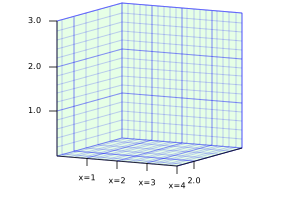 |
|---|
| 77 | |
|---|
| 78 | All these customizations are `Axes3dStyle` methods. |
|---|
| 79 | |
|---|
| 80 | In the chart, `tick_size(8)` produces tick marks 8 pixels long. You can use |
|---|
| 81 | `(5u32).percent().max(5).in_pixels(chart.plotting_area()` to tell Plotters to calculate the tick mark |
|---|
| 82 | size as a percentage of the dimensions of the figure. See [`crate::style::RelativeSize`] and |
|---|
| 83 | [`crate::style::SizeDesc`] for more information. |
|---|
| 84 | |
|---|
| 85 | `x_labels(4)` specifies a maximum of 4 |
|---|
| 86 | tick marks and labels in the X axis. `max_light_lines(5)` specifies a maximum of 5 minor grid lines |
|---|
| 87 | between any two tick marks. `axis_panel_style(GREEN.mix(0.1))` specifies the style of the panels in |
|---|
| 88 | the background, a light green color. `bold_grid_style(BLUE.mix(0.3))` and `light_grid_style(BLUE.mix(0.2))` |
|---|
| 89 | specify the style of the major and minor grid lines, respectively. `label_style()` specifies the text |
|---|
| 90 | style of the axis labels, and `x_formatter(|x| format!("x={x}"))` specifies the string format of the X |
|---|
| 91 | axis labels. |
|---|
| 92 | |
|---|
| 93 | # See also |
|---|
| 94 | |
|---|
| 95 | [`ChartContext::configure_mesh()`], a similar function for 2D plots |
|---|
| 96 | */ |
|---|
| 97 | pub fn configure_axes(&mut self) -> Axes3dStyle<'a, '_, X, Y, Z, DB> { |
|---|
| 98 | Axes3dStyle::new(self) |
|---|
| 99 | } |
|---|
| 100 | } |
|---|
| 101 | |
|---|
| 102 | impl<'a, DB, X: Ranged, Y: Ranged, Z: Ranged> ChartContext<'a, DB, Cartesian3d<X, Y, Z>> |
|---|
| 103 | where |
|---|
| 104 | DB: DrawingBackend, |
|---|
| 105 | { |
|---|
| 106 | /// Override the 3D projection matrix. This function allows to override the default projection |
|---|
| 107 | /// matrix. |
|---|
| 108 | /// - `pf`: A function that takes the default projection matrix configuration and returns the |
|---|
| 109 | /// projection matrix. This function will allow you to adjust the pitch, yaw angle and the |
|---|
| 110 | /// centeral point of the projection, etc. You can also build a projection matrix which is not |
|---|
| 111 | /// relies on the default configuration as well. |
|---|
| 112 | pub fn with_projection<P: FnOnce(ProjectionMatrixBuilder) -> ProjectionMatrix>( |
|---|
| 113 | &mut self, |
|---|
| 114 | pf: P, |
|---|
| 115 | ) -> &mut Self { |
|---|
| 116 | let (actual_x, actual_y) = self.drawing_area.get_pixel_range(); |
|---|
| 117 | self.drawing_area |
|---|
| 118 | .as_coord_spec_mut() |
|---|
| 119 | .set_projection(actual_x, actual_y, pf); |
|---|
| 120 | self |
|---|
| 121 | } |
|---|
| 122 | /// Sets the 3d coordinate pixel range. |
|---|
| 123 | pub fn set_3d_pixel_range(&mut self, size: (i32, i32, i32)) -> &mut Self { |
|---|
| 124 | let (actual_x, actual_y) = self.drawing_area.get_pixel_range(); |
|---|
| 125 | self.drawing_area |
|---|
| 126 | .as_coord_spec_mut() |
|---|
| 127 | .set_coord_pixel_range(actual_x, actual_y, size); |
|---|
| 128 | self |
|---|
| 129 | } |
|---|
| 130 | } |
|---|
| 131 | |
|---|
